

MacBook Pro Screen Replacement
Cracked or failed display on your MacBook Pro? We handle MacBook Pro display replacement at our Burwood and Newtown workshops, usually the same day, with a six-month warranty. No Apple queue, no shipping your machine interstate, and a fixed price before we start.

Professional MacBook Pro Screen Replacement
Cheap Mobile Repair has handled Apple MacBook Pro screen repair across Sydney since 2015. The Pro is the machine people work on, so a cracked MacBook Pro screen repair is rarely just an inconvenience — it stops the job. That is why most repairs go out the same day.
MacBook Pro displays are among the most demanding panels Apple builds. The 14-inch and 16-inch models use a Liquid Retina XDR panel with mini-LED backlighting, bonded into a sealed assembly. MacBook Pro Retina display repair is therefore an assembly replacement, not a panel swap, and colour accuracy after fitting matters if you work in photography, video or design. We calibrate and test before the machine goes back.
We also work at board level. A MacBook Pro with no image, no backlight or no power is diagnosed properly under a microscope rather than written off. For non-Apple machines, see our laptop repair services.
MacBook Pro Models We Repair
Every generation from the 2019 Intel models through to the current M5, in 13-inch, 14-inch and 16-inch sizes.
- MacBook Pro M5 (14-inch, 2025 · A3434)14.2″
- MacBook Pro M5 Pro (14-inch, 2025)14.2″
- MacBook Pro M5 Max (16-inch, 2025)16.2″
- MacBook Pro M4 (14-inch, 2024 · A3185)14.2″
- MacBook Pro M4 Max (16-inch, 2024 · A3403)16.2″
- MacBook Pro M3 (14-inch, 2023 · A2992)14.2″
- MacBook Pro M3 Max (16-inch, 2023 · A2991)16.2″
- MacBook Pro M2 Pro (14-inch, 2023 · A2779)14.2″
- MacBook Pro M2 Max (16-inch, 2023 · A2780)16.2″
- MacBook Pro M2 (13-inch, 2022 · A2338)13.3″
- MacBook Pro M1 Pro (14-inch, 2021 · A2442)14.2″
- MacBook Pro M1 Max (16-inch, 2021 · A2485)16.2″
- MacBook Pro Intel (13/15/16-inch, 2019–2020)13.3″–16.0″
Your Apple model number is printed on the underside of the case and starts with “A” — A2442, A2485, A2779, A2780, A2992, A2991, A3185 and A3403 are the ones we handle most. Quote it when you call and we can confirm the right assembly for your MacBook Pro LCD replacement and the price before you travel in.
Signs Your MacBook Pro Screen Needs Replacing
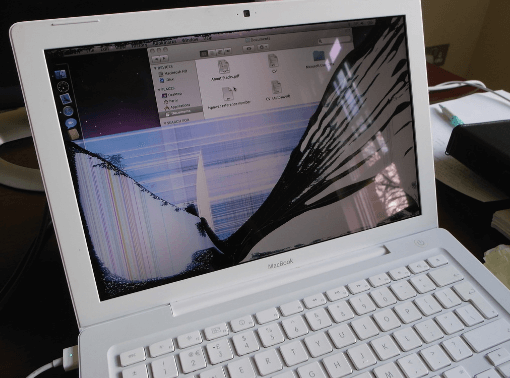
- Cracked or shattered glass, even if the image is still visible
- Black screen while the machine is clearly running and making sound
- Flickering, flashing, or vertical and horizontal lines
- Stage light effect or uneven brightness along the bottom edge
- Dead pixels, dark patches or blooming beyond normal mini-LED behaviour
- Backlight failure — image only visible under a torch
- Damaged hinges, or a lid that no longer closes flush
Not every dark screen is a dead panel. It can be the display cable, the backlight circuit or the logic board, which is why every MacBook Pro display repair starts with a diagnosis rather than us selling you a part you may not need. If liquid was involved, start with liquid damage repair, since a spill rarely stops at the screen.
If you have just cracked it, stop opening and closing the lid. Flexing a broken panel pushes glass toward the hinge and can turn a straightforward assembly swap into a more expensive repair.
Why Choose Cheap Mobile Repair
- Same day on most repairs. Apple typically quotes three to seven days and often ships the machine away.
- Six-month warranty — and our guide to OEM vs aftermarket screens explains the parts choice on parts and workmanship.
- Free diagnosis and a fixed quote before anything is opened.
- Board-level capability. When another shop says it cannot be fixed, we are often the ones who can.
- Colour calibration and full testing after fitting, not just a power-on check.
- Free pickup and delivery if you cannot get to a store.
MacBook Pro Screen Replacement Process
- Free diagnosis. Panel, cable or board — we establish which before quoting.
- Fixed quote. You approve the price before work begins.
- Replacement. The assembly is fitted in a clean, static-safe workspace.
- Testing and calibration. Brightness, colour, True Tone, camera, microphone and lid sensors.
- Handover. Six-month warranty, a tax invoice, and your data exactly as you left it.
MacBook Pro Screen Repair Cost
Three things move the price. The model, since a 16-inch XDR assembly costs considerably more than a 13-inch panel. Whether the fault is limited to the display or has also affected the cable or board. And the parts grade, which we explain rather than decide for you.
We quote on the actual machine rather than publishing a number that may not apply to yours. Diagnosis is free, the quote is fixed before work starts, and if you choose not to proceed you take the machine away at no cost. Call with your model number for an indicative price, or send us a photo of the damage and we will come back to you.
Worth weighing against replacement: a new 14-inch Pro starts well above two thousand dollars. If the rest of the machine runs well, and after a cracked screen it usually does, repairing is comfortably the cheaper decision.
Liquid Retina XDR and What It Means for Repair
The 14-inch and 16-inch MacBook Pro use a mini-LED backlight behind the panel, which is what produces the brightness and contrast the machine is sold on. It also means the display carries more electronics than an ordinary laptop screen, and that a poor-quality replacement assembly is obvious the moment you look at it. Colours sit wrong, brightness is uneven, and HDR content loses the depth you paid for.
We are straight with customers about this. Where a genuine assembly is available we will offer it and tell you the price. Where a high-grade equivalent makes better financial sense on an older machine, we will say so. What we will not do is fit a cheap panel and let you discover the difference a week later.
Blooming is worth mentioning too, since it worries people who have just had a screen replaced. A faint halo around bright objects on a dark background is normal mini-LED behaviour, not a fault. Uneven patches, dark bands or a bright edge are not normal, and if you see those after a repair, bring the machine back.
Repairing Versus Replacing Your MacBook Pro
A cracked screen on a machine worth two to four thousand dollars is almost always worth repairing. The calculation only shifts on much older Intel models, where the cost of an assembly can approach what the whole laptop is worth secondhand.
We will do that arithmetic with you honestly. If your 2019 Intel Pro needs an expensive display and the battery is also failing, we will tell you what both cost together and let you decide, rather than quoting one repair and mentioning the other after you have committed. On any recent Apple silicon Pro, though, the answer is nearly always repair — the machine has years left in it.
Screen damage sometimes travels with other faults. You may also want our data recovery service, or our liquid damage repair page if a spill was involved.
Frequently Asked Questions
How much does MacBook Pro screen replacement cost?
It depends on the model and the display type. A 13-inch M2 costs less than a 16-inch Liquid Retina XDR panel, because the assemblies themselves differ sharply in price. Diagnosis is free and you get a fixed quote before any work starts.
Can a cracked MacBook Pro screen be repaired?
Yes. On Retina and Liquid Retina XDR models the glass, panel and backlight are bonded into a single assembly, so a cracked MacBook Pro screen repair means replacing that assembly. The rest of the machine, including your storage, is untouched.
How long does MacBook Pro screen replacement take?
Most are same day. The fitting itself takes around an hour, plus testing and colour calibration. Sixteen-inch XDR panels occasionally need ordering, and we will tell you that upfront.
Will I lose my data?
No. A screen replacement does not touch the SSD. We still suggest a backup first as routine. If your Pro will not boot, our data recovery service can retrieve files before any repair.
Do you repair the M4 and M5 MacBook Pro?
Yes. We cover every generation from the 2019 Intel models through M1, M2, M3, M4 and the current M5, in 13-inch, 14-inch and 16-inch sizes.
My MacBook Pro screen has stage light or uneven backlight. Can you fix it?
Yes. Uneven backlight along the bottom edge is a known fault on the butterfly-era Pros and is usually a display cable or assembly issue. Bring it in and we will diagnose it properly.
Do you repair liquid damaged MacBook Pros?
Yes. We work at board level under a microscope. See our liquid damage repair service. Liquid damaged devices are not covered by the repair warranty.
Is there a warranty?
Six months on parts and workmanship, provided there is no new physical damage. A third-party repair voids any remaining Apple warranty, so if the machine is still under AppleCare, go to Apple first.
Can you replace just the LCD panel?
On the 2019 Intel models it is sometimes possible. On Retina and Apple silicon models the display is sealed, so a MacBook Pro LCD replacement means the full assembly. The free diagnosis confirms which applies.
Do you offer a fast turnaround for work deadlines?
Tell us when you need it. Most Pro screens are done the same day, and if you are on a deadline we will prioritise the job and be honest if the timing is not achievable.
Visit Our Stores
We handle MacBook Pro LCD repair in Sydney from our Burwood store at 10 Burwood Rd, and our Newtown store at Shop 1A, 2 Enmore Road, two minutes from Newtown station. Customers in Parramatta can also use our free pickup and delivery service for added convenience.
Not sure which repair you need? Start with our main MacBook screen replacement page, browse our full laptop repair services, or get in touch and we will point you in the right direction. Want the full picture first? Read our guide to MacBook screen replacement costs and timing in Sydney.



